
Gaming After SCI: What I’ve Learned From Mobile, Consoles, and Beyond

Do you want to know what is incredibly boring? I’ll tell you: sitting in a hospital room for a year and a half. I swear I memorized every tile pattern on the four walls surrounding me and every dot in the ceiling tiles above me. Having access to adaptive gaming as a patient in the spinal cord injury ward would have been a game changer.
When you’re on bedrest with very little independence, time moves at a crawl. For me, gaming became one of the first ways to pass that time and, eventually, one of the most important ways to reconnect with myself after my injury. What started as a way to kill time on an iPad turned into a long-term exploration of what accessible gaming can look like across platforms.
This post is part personal history, part resource guide, and part reminder that gaming does not have to end after becoming disabled.
Where It Started: Mobile Gaming
Before I left for the Army, a small mobile game called Clash of Clans came out. I was broke, on my own, and it ran on my phone. That alone made it perfect.
My Army buddies gave me plenty of grief because I was impatient and absolutely not free-to-play. My Ranger platoon even started a clan together. For a while, it was a fun way to build camaraderie and break up the monotony of slow days, but like most apps, it eventually faded for everyone else. I never really stopped playing.
After my injury, mobile gaming became essential. My iPad was a godsend during long hospital days. Regaining access took a lot of trial and error with splints, positioning, and assistive tools to figure out what actually worked for me.
What helped most was simple:
- A cloth-tip stylus (felt tips last longer and do not smudge screens like rubber tips)
- A universal cuff for stability and control
Mobile Games I Still Play
- Clash of Clans
- Clash Royale
- Star Wars: Galaxy of Heroes
- Call of Duty Mobile
- Brawl Stars
Consoles: Coming Back to What I Loved

Xbox
I grew up on Xbox. Most Fridays, my friends would pile into basements, order food, and play until way too late. Gaming was social, loud, and familiar.
In 2017, lying in bed paralyzed and unable to use my hands, I genuinely thought my gaming days were over. It was a hard realization, but I had accepted it. Then Microsoft released the Xbox Adaptive Controller. That controller changed everything for me.
At its core, it is two large buttons and a hub that allows you to plug in external switches, joysticks, and buttons to replicate or replace traditional controller inputs. The real power is customization. No two setups look the same, and that is the point.
One practical tip: Xbox Game Pass. Paying a small subscription fee makes it much easier to test games without risking $60 on something that may not work with your setup or physical abilities. Please learn from my mistakes. Not all games will work for you and it will take some trial and error. No need for that to impact your wallet unnecessarily.
Another powerful but hard-to-get tool is the QuadStick. It often sells out immediately after restocks, but for gamers with limited or no hand function, it can be a game-changer.
I have also had good experiences with Bluetooth switches and buttons from GlassOuse, including bite switches and proximity switches. These can connect directly or through the Xbox Adaptive Controller using a 3.5 mm input.
Nintendo Switch
The Nintendo Switch deserves credit for flexibility. It can be used as a handheld tablet, propped up on its built-in stand, or docked to a TV like a traditional console.
It also supports third-party controllers and Bluetooth connectivity, which opens the door to creative and adaptive setups. Even without official adaptive hardware, the system’s modular design makes it one of the more accessible consoles out of the box.
Attached is a video demonstrating how I’ve adapted my Nintendo Switch so I can lift it and place it into its charging dock.
PlayStation and Adaptive Progress

I personally do not use PlayStation, but console gamers are famously divided into two camps. That is why it was exciting to see Sony announce their adaptive controller project, originally called Project Leonardo and now released as the PlayStation Access Controller.
While I cannot personally vouch for it, several quadriplegic friends use it successfully and speak highly of the flexibility it offers. Watching major brands prioritize accessibility in real time has been genuinely encouraging.
The following video was put together by my friend Derek and it shows how he uses his PlayStation Access Controller in his gaming setup.
2023 Update: Virtual and Augmented Reality


Virtual Reality
A few years ago, my wife surprised me with an Meta Quest 2. While VR controllers are not particularly quadriplegic-friendly, the experience itself opened new doors.
Virtual reality makes it possible to attend events without leaving your home. To be courtside at a basketball game. To attend a concert while lying in bed. The therapeutic potential is enormous, especially for people stuck on bedrest or dealing with isolation.
I wish I had access to VR during the earliest days of my injury. Being able to escape, even briefly, would have been a great reprieve. Organizations like Easterseals sometimes help individuals access adaptive technology like this through grants and programs.
Augmented Reality
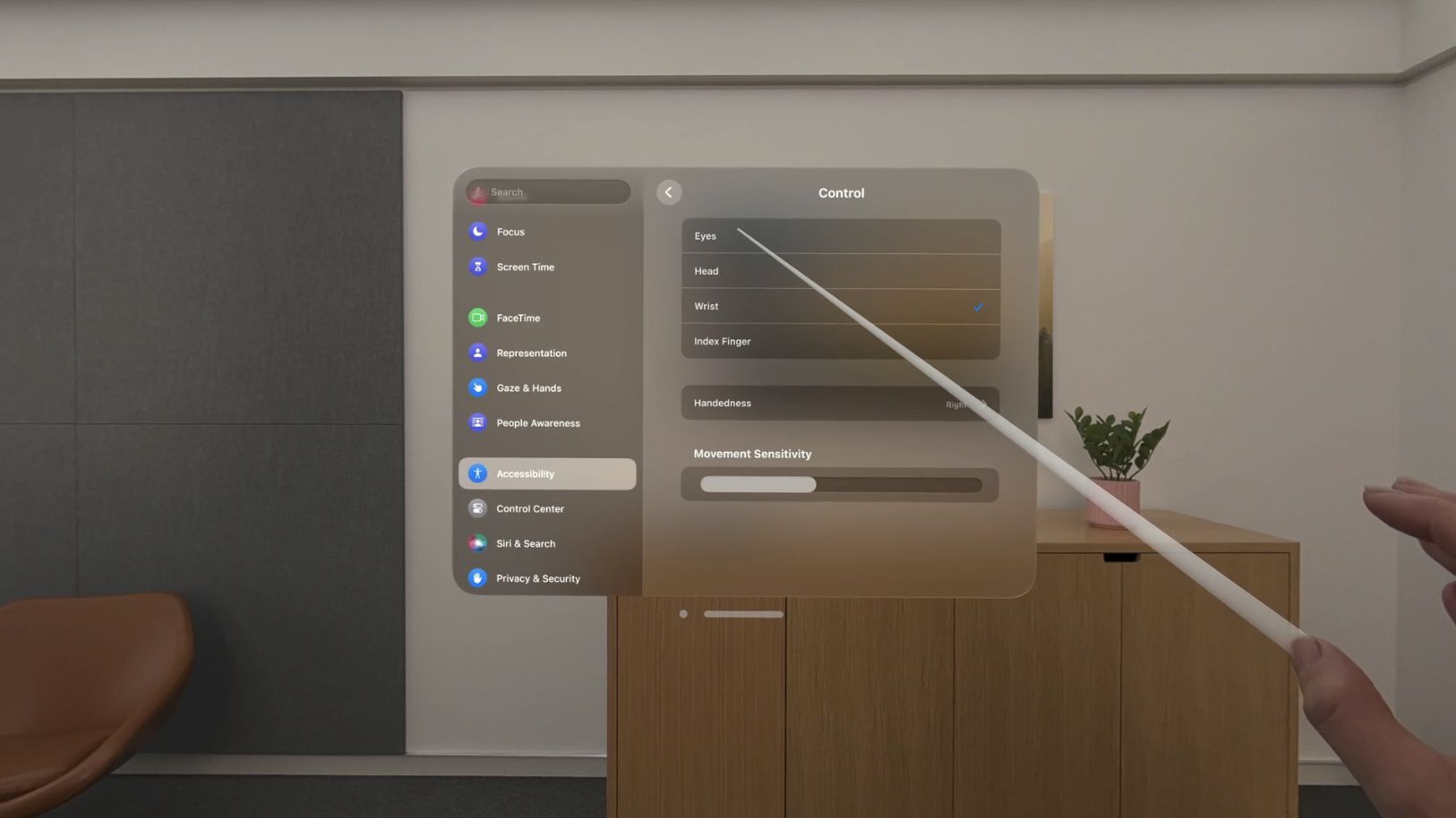
Apple’s Apple Vision Pro brought a new level of accessibility into the conversation. Features like eye-based dwell control and pointer gestures reduce reliance on fine motor movement and show clear intentionality around inclusive design.
The biggest barrier is price. At over $3,000, it is not realistic for most people without grant support. Still, it is encouraging to see accessibility built into a flagship device rather than treated as an afterthought.

2025 Update: Desktop Gaming
More recently, I have started spending time desktop gaming. Even as a full-time student, I have found ways to sink a surprising amount of hours into games that work with my setup. I break down my computer access, adaptations, and game recommendations in a separate post for anyone curious about that side of things.
Gamers and Resources Worth Following
- RockyNoHands – High-level gamer using the QuadStick
- MikeTheQuad – C6 quadriplegic using the Xbox Adaptive Controller
- Pusha_D1 – C7 quadriplegic using PlayStation’s Access Controller
- Gamers With Disabilities Subreddit – A great place to learn, ask questions, and connect
Final Thoughts
I am by no means a gaming professional, nor am I exceptionally good at any of these games. Although I am more of a hobbiest, gaming has been one of the most consistent ways I have stayed connected to joy, community, and normalcy after spinal cord injury. It has looked different at every stage, and it will probably continue to evolve, but it has been a pleasant way to kill some time and distract myself a bit.
If this post helps even one person in the SCI community pick a controller back up, experiment with a new setup, or feel less alone, then it has done its job.
Thanks for reading, and I hope to see more of us gaming again.
One thought on “Game On: Adaptive Gaming”